
P1 CONCEPT · SERVICES
Less organizing.
More time for your day.
Start with one calendar, expense, or CRM workflow. We build around your day and the tools you already use.
Illustrative workflow. Availability, supported inputs and connections are agreed for each project.
01 / Calendar
Keep changing plans
under control.
School notices, work meetings, and family plans. Turn scattered messages into a schedule you can review and share.
- Send details through familiar tools
- Review changes before they happen
- Share a printable family schedule

ONE EVERYDAY EXAMPLE
- 01 · Your message“Allie school meeting, Oct 15, 4–5pm.”
- 02 · Assistant checks“Like last time? No conflicts in connected calendars. Add to Family?”
- 03 · You confirm“Yes, add it.”
- 04 · Calendar updatedAllie’s school meeting
Oct 15 · 4–5 p.m.
Family calendar + printable schedule
Illustrative example with fictional details. Available inputs, connections, and checks depend on your agreed project. Calendar example assumes an existing family profile.
What your project can include
- Receiving appointment details through an agreed channel, such as WhatsApp text, images, documents, or voice messages.
- Preparing event drafts with dates, times, locations and relevant notes.
- A review and confirmation step before calendar changes.
- Organizing work, business and family events within the agreed calendar structure.
- Schedule summaries and printable versions for grandparents, caregivers, and other collaborators, where included in scope.
We agree with you
Which calendars and accounts are involved, who can access them, how changes are approved and what happens when details are incomplete. Calendar providers and messaging channels are confirmed for your project.
02 / Expenses
Know what
belongs where.
A receipt, a business purchase, a family expense. Keep the details together and the categories clear.
- Capture receipt details
- Separate household and business expenses
- Review and export organized records

ONE EVERYDAY EXAMPLE
- 01 · Receipt photo
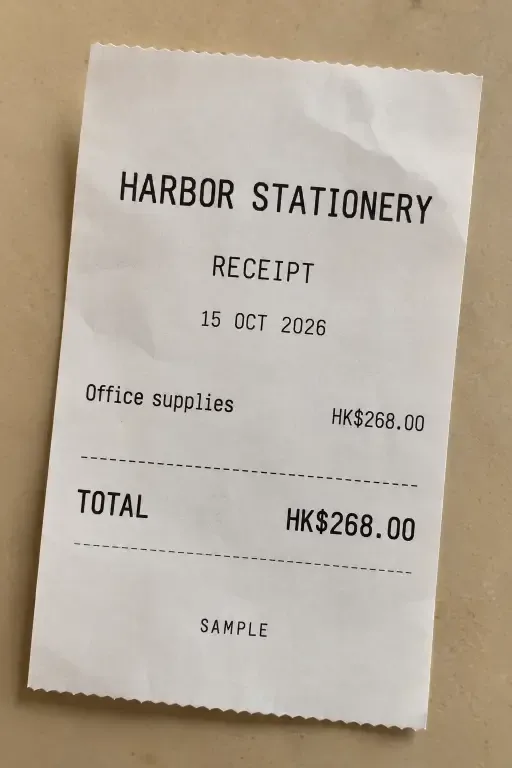
- 02 · Suggested recordMerchant: Harbor Stationery
Amount: HK$268
Category: Office supplies - 03 · You review“Business A, not household.”
Confirm the corrected category. - 04 · Ready to exportBusiness A · Office supplies
HK$268 · Source receipt attached
Illustrative example with fictional details. Available inputs, connections, and checks depend on your agreed project.
What your project can include
- Importing agreed receipt, statement or transaction formats.
- Extracting details such as date, merchant and amount.
- Categorizing household and business expenses using rules you help define.
- Flagging uncertain entries for review and correction.
- Linking organized records to their source documents.
- Preparing summaries and exports in agreed formats.
We agree with you
The source formats, categories, business boundaries, review steps and outputs. Any accounting-system connection or additional reporting is scoped separately. Accounting and tax decisions remain with you and your advisors.
03 / Relationships & follow-up
Remember the person.
Follow through.
You may meet someone as a parent, a colleague, or a business owner. Keep the conversation and the next step connected with a personal CRM workflow.
- Remember how you met
- Connect opportunities to the right business
- Review suggested follow-ups

ONE EVERYDAY EXAMPLE
- 01 · After school pickup0:12Transcript“Met Alex at pickup. Runs a design business. We agreed I’d send an introduction Friday.”
- 02 · Contact draftAlex · Met at school pickup
Design business
Introduction discussed - 03 · You reviewConfirm the contact, business context, and follow-up date.
- 04 · Next step savedFriday: prepare an introduction.
You review it before sending.
Illustrative example with fictional details. Available inputs, connections, and checks depend on your agreed project.
What your project can include
- Organizing contacts, organizations and the context in which you met.
- Keeping permitted meeting notes and interaction history together.
- Recording an opportunity against the relevant business.
- Preparing meeting briefs from information you are authorized to use.
- Turning reviewed notes into next actions and follow-up dates.
- Summarizing permitted recordings or transcripts where included in scope.
We agree with you
Which contact sources can be used, what information can be shared, who can access it and how proposed next actions are reviewed. Contacts from an employer or another organization are included only where you have permission.
BUILT AROUND YOUR NEEDS
Start with one workflow.
We agree on the scope, connections, deliverables, price, and support before building. These are custom projects, with further improvements agreed as your needs develop.
A few useful answers.
Do I need to replace the tools I use?
We start by reviewing your existing tools. We then confirm which connections are practical and what, if anything, needs to change.
Can work, business and family information remain separate?
We agree the categories, access rules and sharing boundaries during scoping. A combined personal view does not mean giving every organization access to all your information.
Will AI act without me reviewing it?
We agree what the system may do and which actions need your confirmation. Calendar changes, external messages and other consequential actions need clearly defined approval rules.
How is pricing decided?
Pricing is based on the agreed work, connections and support. Any recurring service or third-party charges included in the proposal are identified before you commit.
What support is included?
Support arrangements are agreed as part of your project. You can contact Michael through the published email or WhatsApp number.
Which part of your day
would you like to make easier?
Start with one task or question you would like to explore.